

CGA Electronics Store
Anmite 10.5-Inch Portable Monitor 1280P HDR 15:10 Low Blue Light For XBox PS4 / 5 Switch Cell Phone PC Loptop Extension
Anmite 10.5-Inch Portable Monitor 1280P HDR 15:10 Low Blue Light For XBox PS4 / 5 Switch Cell Phone PC Loptop Extension
Couldn't load pickup availability
SPECIFICATIONS
Bracket Type: Ordinary Bracket
Brand Name: Anmite
Built-in Speaker: Yes
Certification: CE,FCC,RoHS
Choice: yes
Display Ratio: 15:10
Feature: Usb port, Speaker, Gaming
High-Dynamic Range: None
High-concerned Chemical: None
Horizontal Viewing Angle: 178°
Interface Type: Type-C
Origin: Mainland China
Panel Type: IPS
Products Status: STOCK
Refresh Rate: 60 Hz
Refresh rate sync technology: AMD FreeSync Pro
Resolution: 1920x1280,1920x1280
Screen Type: LED
Screen curvature: None
Screen surface: MATT
Vertical Viewing Angle: 178°
ANMITE 10.5" Portable Monitor
WUXGA 1920×1280 | Ultra-Light 300g Body
▲ Display Excellence
-
10.5" IPS Panel with 60Hz Refresh Rate
-
HDR Enhanced | 420cd/m² Brightness
-
178° Wide View Angle & 100% sRGB
▲ True Color Performance
-
8-bit Color Depth (16.7M Colors)
-
Natural Gradient Transitions
▲ Smart Connectivity
-
Military-Grade Mini HDMI (3,000+ Cycle Test)
-
Dual Type-C 3.1 Ports
📦 Complete Package
✔ Portable Monitor
✔ Foldable Stand
✔ HDMI Cable
✔ USB Power Cable
✔ Type-C 3.1 Cable


Monitor FAQ - Common Troubleshooting
Q: The screen displays "blue no signal"
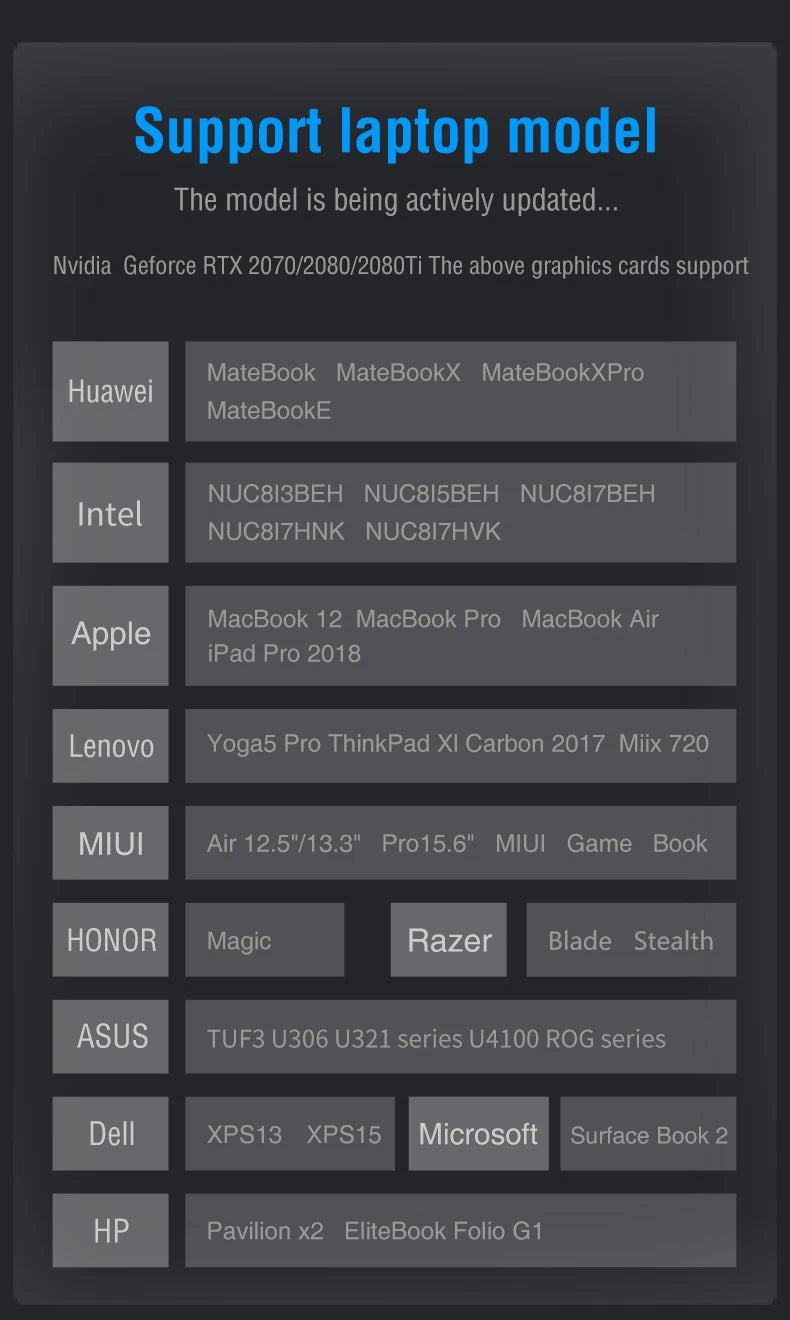
A: If you use a mobile phone to connect, you need to check whether the phone supports USB3.1 version output, whether it supports DisplayPort alternative mode (DP Alt Mode), and whether it supports MHL protocol mode. If not, it may be incompatible. You can use some converters for compatibility, such as: HD adapter cable. If not, it will display a blue no signal state. Please add a Mini HDMI to HDMI cable for signal transmission. If you use HDMI connection, you need to check whether your graphics card is connected correctly. As long as it displays blue no signal, it proves that there is no problem with the monitor, but there is no signal input. If there is a discrete graphics card, you must connect the discrete graphics card.
Q: Do I need to connect the power supply when using
it?
A: The laptop uses a TPYE-C connection cable and does not need to be connected to the power supply. If the power supply is insufficient, the screen will flicker and USB power supply is required. If you use HDMI connection, you must use USB power supply. If the screen flickers, it may be insufficient power supply.
Q: What causes the screen flickering?
A: The screen flickering is caused by insufficient output or power supply of your device. It is recommended to use a 20W or higher PD power supply.
Q: Does it support vertical screen:
A: The monitor itself does not have the vertical screen function, so it does not support vertical screen. These functions can only be set on the mobile phone. The monitor only provides display functions. Unless you set the mobile phone to computer mode or set the vertical screen on the computer, the monitor itself does not support vertical screen.
Q: Does it support touch function?
A: This product is divided into non-touch version. Please choose the corresponding model according to your needs to place an order to avoid purchasing the wrong model.
Q: My monitor cannot be turned on.
A: Please check whether the monitor and your device are in power-on mode. Make sure the cable is connected correctly. Connect other available devices or cables to check.
If you use the USB-C interface connection: You can use the USB-C cable to achieve power supply and signal transmission (one line for two purposes, also known as one line pass) and get power directly from the laptop. If you use the HDMI interface connection, you must use a two-wire connection solution. The HDMI cable is only responsible for video signal transmission. You need an additional power supply solution. You can choose one of the following methods:
A1: Powered by a power adapter connected to the socket (20W and above PD power is recommended)
A2: Powered from the computer USB through a separate USB cable (If the computer USB power supply is insufficient, false alarms such as insufficient brightness, flickering, black screen, etc. may occur. It is recommended to use a 20W and above PD power supply).
Q: Why is my screen flickering?
A: Please check if the connection is loose. If there is no problem with the connection, the screen flickering is caused by insufficient output of your device or power supply. It is recommended to use a 30W or higher PD power supply. Please connect the adapter and use it again or try to replace new cables and devices.
Q: Why does the monitor make an electric current or
rustling sound?
A: Please confirm the source of the noise. If it is a connection noise, please re-plug the interface or replace a new cable. If it is the sound of the adapter or speaker, it may be due to the quality problem of the power adapter.
Q: Does this computer monitor support VESA wall
mounting?
A: Support VESA wall mounting
Q: Is there a speaker?
A: Yes, with built-in speakers.
Q: Does it support Apple phones?
A: Basically not. However, after testing, iPhone 15 PRO and higher versions may be able to cast screens, but they do not support vertical screen and touch functions.